Key takeaways
- This worked example is entirely synthetic: it describes a proposed workflow and expected outcomes, not a client project or an executed product benchmark.
- The proposed workflow runs in six steps: register intake, propose assignment, compare the checklist, prepare the request, obtain domain approval and track execution.
- The firm retains the professional decision about which documents are required; the workflow does not give tax advice, post transactions or file returns independently.
- Expected documents, actual submissions and resulting tasks are three separate records, which prevents a single upload from closing an entire monthly checklist.
- Measure completed requirements, unnecessary contacts, unresolved tasks and actual handling time rather than the number of drafts produced.
01 / 13
What is the fictional firm's task?
A team is collecting documents for September 2026. A domain owner maintains the expected-document list for each client. Staff currently assign arrivals manually, record unresolved items and draft requests in the mailbox.
The proposed workflow supports assignment and preparation. The firm retains the professional decision about which documents are required. The workflow does not give tax advice, post transactions or file returns independently.
02 / 13
How does the workflow get from intake to an approved request?
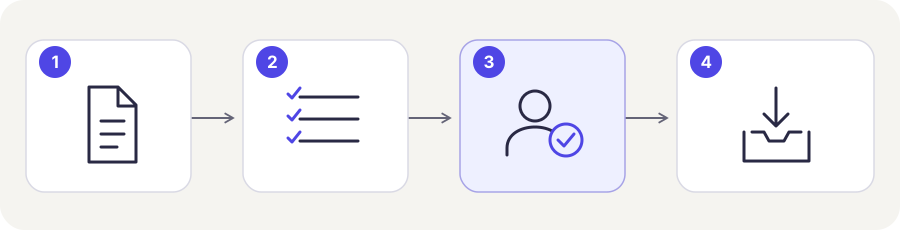
The proposed tax-firm document workflow runs in six steps:
- Register intake: store the file, arrival time and stable transaction identifier. Keep the original linked to its processing status.
- Propose assignment: derive client and period from permitted information. Do not guess between several plausible matches.
- Compare the checklist: use only expectations maintained by the firm. Refer unclear or outdated lists for review.
- Prepare the request: display unresolved items with their current status, recipient and period.
- Obtain domain approval: check arrivals again before sending. A new document may invalidate the draft.
- Track execution: retain sending status. Resolve an uncertain outcome before retrying.
03 / 13
Six synthetic cases and expected outcomes
Worksheet
CSV worksheet
| id | evidence_status | input | expected_result |
|---|---|---|---|
| K01 | synthetic_expected_not_run | Clear client; correct period; expected document | Mark received; no request for this document |
| K02 | synthetic_expected_not_run | August document for September checklist | Review period mismatch; September remains open |
| K03 | synthetic_expected_not_run | Same file arrives twice | Record duplicate; no new transaction |
| K04 | synthetic_expected_not_run | Sender matches two clients | Stop automatic assignment; owner decides |
| K05 | synthetic_expected_not_run | Missing file arrives after draft creation | Stop or update draft; obtain fresh review |
| K06 | synthetic_expected_not_run | Message sent; confirmation lost | Resolve sending status before retry |
Columns to fill in, in the file: actual_result, reviewer, tested_at.
Six synthetic cases define the expected behaviour of the proposed workflow:
| ID | Input or state | Expected outcome |
|---|---|---|
| K01 | Clear client, correct period, expected document | Mark received; do not request this item |
| K02 | Document says August, not September | Refer period mismatch for review; September remains open |
| K03 | Same file arrives again | Record repeat arrival; do not create another transaction |
| K04 | Sender matches two clients | No automatic assignment; owner decides |
| K05 | Missing item arrives after drafting | Stop or update the draft before sending; review again |
| K06 | Message is sent but confirmation is lost | Resolve status; do not retry blindly |
These are expected behaviours, not observed test results. The CSV worksheet (CSV) intentionally leaves actual result, reviewer and test date blank. Complete them only after a real test.
04 / 13
Which questions come before connecting software?
Five questions need answers before software is connected:
- Where is the authoritative checklist?
- Where is receipt confirmed?
- Which client identifier may cross system boundaries?
- Is the necessary read or write access available?
- Which staff may see which clients?
A product name alone cannot answer these questions. In Austria, start with the BMD capability assessment. A German DATEV or Swiss fiduciary environment needs its own supported data route assessed separately.
05 / 13
Model the practice's cases explicitly
This example uses three separate records: expected documents, actual submissions and resulting tasks. One requirement may need several files, and a file may answer more than one requirement. Recording these relationships prevents a single upload from closing an entire monthly checklist.
The three records of this example hold different information:
| Record | What it contains |
|---|---|
| Expected document | Client identifier, period, document type, professional reason and responsible role |
| Submission | Its own identifier, source, arrival time and original reference |
| Task | Connects expectation and submission and describes the next decision |
A clarification request therefore belongs to a traceable case rather than existing as an isolated email draft.
Four invented cases illustrate how expectation, submission and decision relate:
| Example identifier | Expectation | Submission | Decision |
|---|---|---|---|
| M17-09-BANK | September bank statement | August statement | September remains open |
| M17-09-RENT | September rent document | PDF followed by an identical scan | One case with two intake events |
| M17-09-LEASE | New lease agreement | Unsigned draft | Accountant determines the required version |
| M18-09-BANK | Another client's bank statement | Similar filename | Do not assign by filename alone |
These identifiers and records are invented. In a real practice, expectations and professional decisions come from responsible employees. AI may suggest a possible additional gap, but it becomes an authoritative client request only after review.
06 / 13
A complete working day in the document workflow
08:30. At 08:30 a document arrives. The workflow records it and proposes the M17-09-RENT requirement. The source matches the client, the period is clear and the file is readable. Intake is confirmed. Whether all professional questions are resolved depends on the requirement: available and reviewed remain separate facts.
10:00 to 11:00. At 10:00 the system prepares a request for two outstanding items. At 10:15 the client uploads one through the portal. When the employee reviews the draft at 11:00, it is checked against current intake again. The message now asks only for the remaining item, and the obsolete version is not sent separately.
14:00. At 14:00 a reply arrives without a clear case reference. Instead of guessing from the sender's name, the workflow creates an internal assignment task. An employee connects the response to the correct client and records the decision. A reminder is paused while the response may satisfy that requirement.
End of day. At the end of the day, the team reconciles submissions with completed, unresolved and deliberately excluded cases. This exposes documents left behind. It also helps distinguish client delay from a technical interface that temporarily stopped collecting files.
Got a workflow like this?
Tell me about it. Honest take and a rough price, usually within a day.
07 / 13
Record responsibilities and system boundaries
Responsibilities. The practice owns the expected list, professional assessment and recipient approval. The operator owns technical delivery, monitoring and recovery. Client-service staff take over ambiguous or repeatedly unanswered questions. A substitute needs access to the same history without relying on another employee's private inbox.
Existing portal functions. Check existing portal functions first. TaxDome documents structured requests and reminders, while DATEV offers distinct data services for different destination outcomes. These capabilities are not interchangeable by default. TaxDome requests, DATEV data services, checked on 26 September 2026.
Minimum access. A request workflow may need only read access to a status and a controlled messaging channel. It does not automatically need write permission in the accounting ledger. Record the minimum operations required and have the support partner confirm the actual path. This bounds both implementation effort and the consequences of an error.
08 / 13
What happens during an operational outage?
Portal unavailable. Suppose the portal is unavailable for two hours. The workflow must not interpret the absence of newly synchronised files as a professional finding that documents are missing. Expose the technical problem, pause reminders based on uncertain intake and assign an operational task. After recovery, collect the missing events and compare them with previously processed identifiers.
Lost acknowledgement. A separate failure occurs when a message is accepted but its acknowledgement disappears. Check delivery evidence before sending again. If the state cannot be determined, a person takes over. Two identical reminders in quick succession are an avoidable operational error and a poor client experience.
Manual work during a longer outage. Define how staff continue manually during a longer outage. On recovery, those manual decisions must be reflected in the case records. Otherwise automation will remind clients about issues already resolved by telephone.
Test the recovery. Test this recovery with the same care as normal processing. A successful return to operation means no missing submissions, duplicate requests or overwritten human decisions. It is more than restoring a green connection indicator.
09 / 13
Can the client act on the request?
Comprehension test. Add a short comprehension test. Someone who did not draft the message should explain which document is needed, for what period and where to submit it. If those points are unclear, improve the wording even when internal assignment is correct.
Clients with several companies. Also consider a client with several companies. A generic request for missing documents can remain ambiguous despite a correct internal identifier. The message needs sufficient authorised context without unnecessary confidential detail. An internal case number helps only if the recipient can use it.
What the test shows. This does not measure real client satisfaction or replace a pilot. It checks before sending that automation creates an answerable request, providing an additional acceptance criterion beyond data quality and technical delivery.
Who reopens and closes the case?
Also record who reopens the case after a manual correction. A substitute needs the same source documents and task history as the original reviewer; otherwise each change of owner repeats the investigation.
In this example, each open request has a due date and an accountable person. When the expected bank statement arrives, that person checks its period and readability before closing the case. A matching filename is insufficient. If the statement remains incomplete, refine the existing request instead of sending a separate, conflicting task list.
10 / 13
Which evidence is required for operational handover?
Handover package. Provide the current requirement list, roles, status definitions, acceptance cases and a short correction guide. For any failed case, the operator should be able to answer what happened, which client is affected, what has already executed and which next action is permitted.
Assignment versus communication. Assess assignment quality separately from communication quality. A correctly assigned document can still trigger an incorrect reminder if a status update failed. Measure completed requirements, unnecessary contacts, unresolved tasks and actual handling time. These describe the service better than the number of drafts produced.
Stopping outbound messages. The practice should also know how to stop outbound messages while continuing intake. That allows investigation without losing new submissions. Resume only after reconciling the affected cases and confirming which messages remain appropriate.
11 / 13
How does the design become evidence?
Before a real trial, measure current handling time for the same transaction types. In the proposed process, count assignment, review, correction, questions and incident handling. Do not compare a difficult historical backlog with carefully selected easy test cases.
Record the tested environment and every unresolved deviation. Assignment working on synthetic examples does not prove performance on real client correspondence. Sampling and a manual fallback remain useful after acceptance.
We deliberately publish no invented time-saving result. Our measurement method explains how observed outcomes can later be reported. Use the document acceptance template for the technical test route.
12 / 13
Adapt one workflow
Replace the client identifiers, period and document types with professionally approved inputs. Start with one bounded intake channel and somebody able to review outputs. Expand after assignment and exception handling are understandable and working.
See automation for tax firms and document processing for our services. An initial conversation needs only a process description; real client data belongs in an agreed, protected workspace.
13 / 13
Further worksheets and guidance
Worksheet
Download the acceptance worksheet
| Case | Expected |
|---|---|
| Partial submission | Show outstanding items |
| Later document | Update existing case |
| Repeated export | No duplicate document |
Columns to fill in, in the file: Observed, Owner.
Download the acceptance worksheet (CSV)
These guides and service pages cover the decisions next to a tax-firm document workflow: