First examine the native capabilities of the existing product. If another chat solution is required, specify its connection explicitly: channel, identity, fields, ownership, reply route and failure handling. This guide is a proposed integration plan, not evidence of a tested connection to your account.
Key takeaways
The main points for handing chatbot requests to Zendesk or Freshdesk are:
- The article describes three connection routes: native automation, a supported connector or approved app, and a custom API connection.
- A custom connection needs actual field identifiers and permitted values; do not stop after a successful API response.
- Measure requested, acknowledged and actually accepted handovers separately.
01 / 14
Which Zendesk or Freshdesk product configuration do you actually have?
Product and subscription. Record the product, subscription, enabled channels and existing AI capabilities. Zendesk Messaging and older Chat configurations are not identical. For Freshworks, establish whether the business uses Freshdesk, Freshdesk Omni or additional components. A logo on an integration page does not answer that question.
Documented differences. The Freshdesk add-on documentation distinguishes email and chat agents and associates the latter with Freshdesk Omni. Zendesk documents chatbot options by account. Sources checked on 26 September 2026. Demonstrate the agreed workflow in the relevant product scope.
Operating team. Also identify the team operating the destination. A technically compatible account without a managed queue cannot resolve a customer request. Availability, absence and substitution belong in the same specification as the interface.
02 / 14
Native automation, connector or custom API: which connection route fits?
The article describes three possible connection routes: native automation, a supported connector or approved app, and a custom API connection.
Native automation: The existing helpdesk provides knowledge, dialogue and handover. Check whether it covers the required requests and sources. A unified operating environment can be useful, but licence and capability boundaries still need confirmation.
Supported connector or approved app: An external interface connects through a documented product route. Ask specifically about transferred fields, replies, attachments and channels. An app that creates a ticket may not take over an ongoing live conversation.
Custom API connection: This allows defined field mapping but requires operation, access maintenance, monitoring and recovery. It is justified when particular requirements are not adequately covered by the other routes. Making an API call does not give you all the functions needed for a complete customer-service product.
Authoritative status. For every route, identify the authoritative case-status system. Otherwise two independent status lists may make conflicting promises: the chat says complete while the helpdesk is still waiting for required customer information.
03 / 14
How does a Zendesk AI-agent ticket differ from a regular ticket?
Documented behaviour. Zendesk documents AI-agent tickets for fully automated conversations. They initially have read-only characteristics and become regular editable tickets when escalated to staff. Ordinary ticket rules do not simply apply identically to every state.
Planning consequence. This matters during planning. Verify when group routing, required fields, notifications and reporting actually take effect. A ticket identifier does not prove that human handling has begun. A case created through an external ticket API is also not automatically equivalent to native messaging handoff.
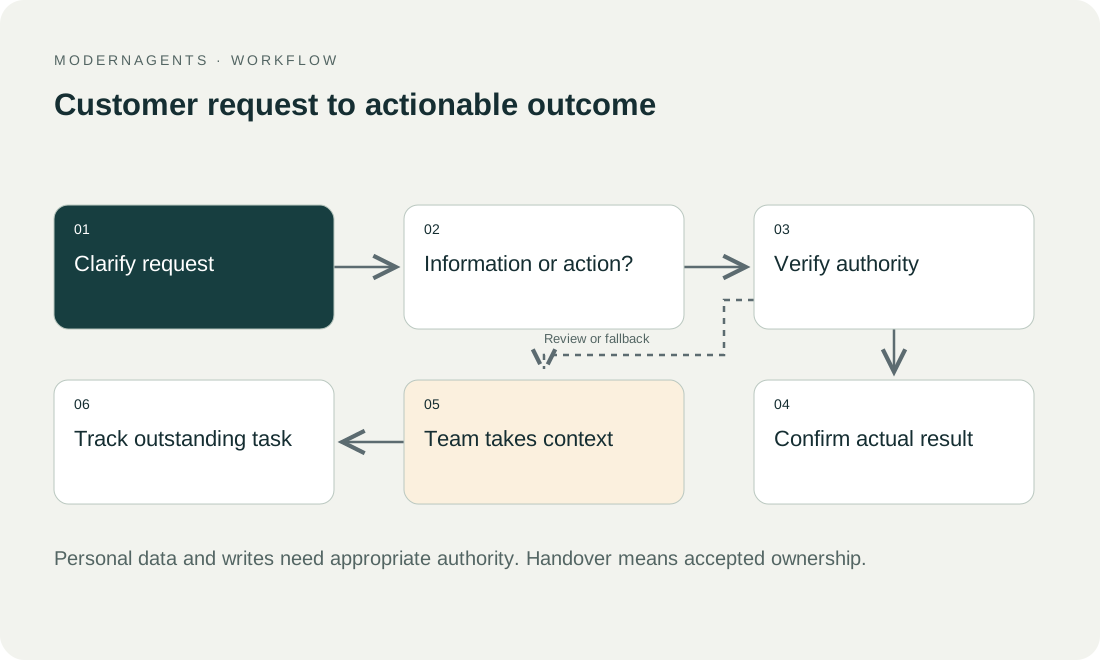
State map. Create a small state map for the destination account: customer speaking with the bot, transfer requested, queue responsible and employee replying. Base it on observed tests rather than assuming similarly named product concepts are interchangeable.
04 / 14
What belongs in the handover package?
The table lists seven pieces of information in the business handover package, each with its meaning and the check before transfer.
| Information | Meaning | Check before transfer |
|---|---|---|
| Operation reference | Connects the chat to the service case | Reusable when investigating repeats |
| Request | Original statement and concise summary | No invented cause or commitment |
| Verification state | What was actually checked | Not inferred from an entered email alone |
| Related record | Authorised order or contract reference | Transfer only necessary information |
| Language and contact route | Requested follow-up | Confirmed or explicitly supplied |
| Previous steps | Work already attempted | Separate success, failure and uncertainty |
| Outstanding decision | Staff task | Ownership and urgency rule defined |
The package should let the next employee act. A full transcript can contain unnecessary confidential information, while an excessively brief summary may omit a decisive qualification. Define which original statements travel with the case and which details remain behind authorised references.
05 / 14
How do you map ticket fields correctly?
Real identifiers. A custom connection needs actual field identifiers and permitted values. The Zendesk create-and-update documentation illustrates custom fields identified by ID, with some selections using internal tags rather than visible labels. Freshdesk has its own ticket API and field definitions. Their formats are not interchangeable.
Build a project mapping table with these columns:
- business meaning
- source value
- destination identifier
- allowed values
- required status
- handling of missing information
The display label “German” may have a different internal representation. A group called “DACH Service” may acquire a different identifier following an organisational change.
Check the ticket. Do not stop after a successful API response. Open the ticket and inspect the visible values, actual group and triggered rules. An accepted but incorrectly prioritised request remains an integration defect.
06 / 14
Synthetic case: damaged goods and an unapproved refund
Request. A fictional customer reports a damaged item and asks for a refund. The bot cannot approve payment. After the intended verification process, it captures the item, description and desired reply route, then transfers the request to the complaints group.
Summary. The summary records that the customer reports damage on delivery, wants a refund that is not yet approved, has confirmed the affected line and has not supplied a photograph. It must not claim the damage was verified or payment initiated. The outstanding decision remains explicit.
Acceptance. During acceptance, an employee opens the ticket, sees the correct reference and requests missing information if necessary. The response reaches the customer through the agreed channel. Only that complete journey demonstrates a usable service transfer rather than creation of a database record.
07 / 14
How do you prevent competing bot and employee replies?
Control of the conversation. Define who currently controls the conversation. Zendesk documents handoff and handback. Verify when the selected connection pauses automatic replies and what permits them to resume.
Messages while waiting. A customer message sent while waiting must not silently start a second conversation. Staff should not repeat questions the bot asked again after transfer. Test simultaneous messages and longer waiting periods explicitly.
Handback. Handback also needs a clear rule. Closing a ticket manually is not necessarily a signal for every integration to generate a new answer. Distinguish a new request from additional information about a still-open problem.
Got a workflow like this?
Tell me about it. Honest take and a rough price, usually within a day.
08 / 14
What happens after partial failures and missing acknowledgements?
Failed attachment. In a synthetic failure case, ticket creation succeeds but attachment transfer fails. Keep the confirmed ticket and make the missing attachment visible. Recreating everything could produce a duplicate. The operator retries the appropriate missing step or assigns it for manual handling.
Lost acknowledgement. In another case, the acknowledgement is lost after successful creation. The chat cannot establish whether the request arrived. Store the operation reference and transfer state, then inspect the destination before another write. An external reference alone is not automatically a vendor-guaranteed duplicate lock.
Deleted group. A further case targets a deleted destination group. The bot should not silently accept an unattended default recipient as success. Agree a controlled alternative and an owner who corrects the mapping.
Manual actions during outages. Reconcile manual actions during outages too. If staff create a case themselves, capture that relationship before automation resumes. Otherwise a recovered queue may recreate work already entered by hand.
09 / 14
How do service hours, responses and escalation fit together?
Out of hours. Out-of-hours ticket intake can be useful, but customers must understand that handling will occur later and have an available reply route. An unstaffed queue must not be presented as an immediate live connection.
Urgency. Urgency should follow approved rules. The model may summarise relevant indicators, but should not assign the highest alarm to every strongly worded message. Define the cases requiring special handling and how employees can correct the classification.
Closing time and substitution. Test a request just before closing time and another during staff substitution. Correct visibility, notification and traceable ownership must still hold. Operational reliability depends on these organisational conditions as well as the software connection.
10 / 14
Which permissions and configuration need maintenance?
Access. Use access limited to the agreed workflow. A chatbot creating tickets does not necessarily need permission to read every customer record. Attachments, internal notes and public replies require appropriate visibility.
Retesting. Assign responsibility for retesting after field changes, subscription changes or new channels. Small changes can alter routing or the reply path. The operational record should identify product configuration, fields, active rules and accountable people.
Retention and deletion. Retention and deletion should cover both the chat and helpdesk copies. A transcript removed from one interface may still exist in an associated ticket or export. Agree the relevant record-handling process with the responsible team rather than assuming one deletion covers every system.
11 / 14
What happens when a ticket field changes?
Changed selection list. When the service team changes a selection list, the visible label may remain familiar while a stored value becomes invalid. Decide who informs the integration owner before such changes. Then test a new request and an existing case that receives another update.
Maintenance case. In the proposed maintenance case, one complaints group splits into two product teams. A request without enough product information should enter an explicitly managed clarification view. It must not disappear or be assigned randomly to the first available team. An accountable person adds the missing context and confirms routing.
Mapping version. Record the tested mapping version and change date. Later investigations can distinguish tickets created under the old rule from those created under the new one. This is particularly useful when several channels write into the same helpdesk and only one source is affected.
12 / 14
Which acceptance cases cover the employee and customer views?
The case set for a Zendesk or Freshdesk handover should cover these cases:
- normal transfer
- explicit human request
- incorrect identity
- missing required field
- duplicate event
- failed attachment
- missing acknowledgement
- an unattended group
For every case, inspect the destination as an employee and verify the customer-facing result.
Measure requested, acknowledged and actually accepted handovers separately. Add repeat contacts and time to a useful answer. Ticket count alone measures neither quality nor saved work.
The result is a documented connection with the correct product scope, verified fields, a staffed response path and specific recovery procedures. “Chatbot with Zendesk or Freshdesk” then describes a service process whose responsibilities and limits remain understandable in operation.
13 / 14
Take the worksheet
Worksheet
Download the editable CSV table
| Field | Content | Check |
|---|---|---|
| Source key | Conversation and handover ID | Recognise redelivery |
| Requester | Verified or explicitly unverified contact | No false identity claim |
| Summary | Request and prior actions | Facts versus inference |
| Ownership | Group and priority rule | Actionable queue |
| Visibility | Public reply or private note | No accidental disclosure |
Columns to fill in, in the file: Your value / observation, Owner, Next action.
Download the editable CSV table (CSV). Add your own values, owners and open actions. This worksheet contains no measured client results.
14 / 14
Related decisions
These pages cover the service overview and the related decisions for a chatbot handover to Zendesk or Freshdesk:
- AI chatbots for customer service
- Customer-service AI chatbots: plan the human handover
- Measure resolved chatbot requests and remaining work
- Launch and operate a chatbot with clear release criteria
For a workflow review, start with the task, systems involved and typical exceptions. Discuss it with modernagents.