Key takeaways
- Material a technical connection can read is not automatically material every user may read.
- Keep three permission questions separate: permission for ingestion to collect sources, a reliably authenticated user identity, and which collected material that identity may access.
- As checked on 26 September 2026, Microsoft still describes SharePoint permission-metadata ingestion into Azure AI Search as a preview capability.
- In Copilot Studio the knowledge-source type matters: Microsoft describes SharePoint/OneDrive connections as using delegated authentication and security trimming, and its configured Azure AI Search connection as non-delegated.
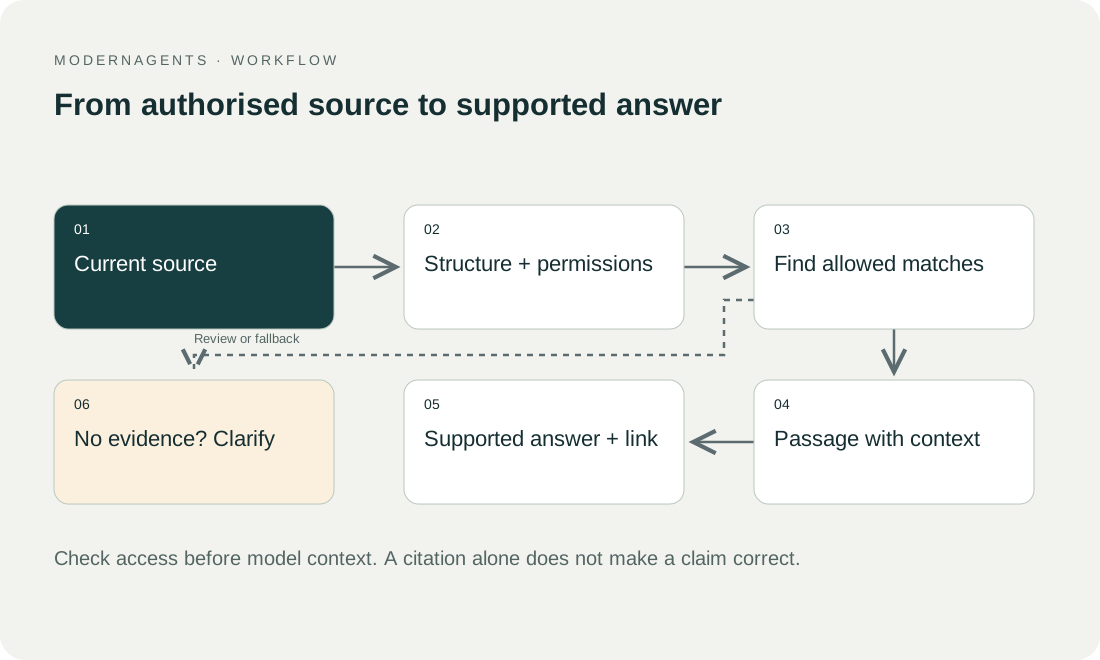
The essential distinction is that material a technical connection can read is not automatically material every user may read. A broadly privileged service identity still requires verified authorization for each request. The model should not receive restricted content and then be expected to decide whether to conceal it.
01 / 14
SharePoint knowledge base or a separate RAG system?
A SharePoint knowledge base can organise approved pages and files without a separate AI application. First test whether clear ownership, navigation and existing search solve the team's problem. If a conversational answer is useful, compare the Microsoft capability available to your organisation with a separate retrieval design. Adding an index is a decision to operate another copy of the information and its access rules.
The following table matches four requirements to a starting point and to what must be demonstrated.
| Requirement | Starting point to assess | What must be demonstrated |
|---|---|---|
| Find the current staff procedure | SharePoint pages, documents and search | Correct version, useful navigation and intended readers |
| Ask questions of permitted SharePoint material | The available Microsoft assistant or Copilot Studio configuration | Supported content, user authentication, citations and current permissions |
| Search several approved systems together | A multi-source assistant, potentially using RAG | Consistent source identity, access enforcement and deletion across systems |
| Apply custom retrieval or answer rules | A deliberately scoped custom design | A measurable benefit over existing tools and an accountable operator |
For example, a fictional operations team asking “Which installation checklist applies?” may need better source ownership rather than a new model. If the answer requires both SharePoint procedures and approved product documentation elsewhere, a broader retrieval layer becomes a candidate. That remains a hypothesis until both options are tested on the same questions and users.
Microsoft documents SharePoint knowledge sources in Copilot Studio together with authentication and content limitations. Use the supported configuration in the intended tenant; a source connection alone does not approve every user's access. Microsoft: add SharePoint as a knowledge source, checked on 27 September 2026.
This article concentrates on the permission boundary after that choice. The broader AI knowledge-base guide covers source selection, ownership and publication. Keep those editorial decisions alongside the technical access tests below.
02 / 14
Which three permission questions must be kept separate?
A RAG assistant using SharePoint has to answer three separate permission questions:
- First, ingestion needs permission to collect sources.
- Second, the application needs a reliably authenticated user identity.
- Third, retrieval must determine which collected material that identity may access.
These stages can use different accounts and technical mechanisms.
A successful import answers only the first question. A successful login answers the second. Targeted queries under different roles establish whether the third works. An administrator demonstration is therefore unsuitable for permission acceptance.
Access to the assistant is another separate control. Microsoft distinguishes permission to use a SharePoint agent from rights to its underlying sources. Opening the agent does not grant access to every connected document. Microsoft: SharePoint agent access.
03 / 14
Direct source access or a copied index: what changes?
With direct user-specific source access, authorization remains close to the authoritative system. A custom index copies content and potentially permission metadata, creating additional synchronization and enforcement responsibilities.
An index can support specialized retrieval, extraction or source combinations. It must also track the active document version and permission state. A file URL alone does not represent those properties adequately.
Microsoft identifies a remote SharePoint knowledge source as an alternative when the full SharePoint permission model is required. Whether that option fits the product, region and intended task is an architecture question. Microsoft: SharePoint ACL indexer.
04 / 14
Does Azure AI Search preserve SharePoint permissions automatically?
Preview status. As checked on 26 September 2026, Microsoft still describes SharePoint permission-metadata ingestion into Azure AI Search as a preview capability. API version and selected indexer features affect support. “SharePoint permissions are automatically preserved” is therefore too broad a claim.
Permission updates and limitations. A significant distinction concerns updates. Documentation describes incremental changes to item-specific permissions from a particular preview version, while inherited changes at parent scopes require an explicit refresh. There are also limitations involving guest users and sharing mechanisms. Compare the current support table with your actual SharePoint structures. Microsoft: prerequisites and limitations.
What the limitations require. These limitations do not rule out indexing universally. They require a deliberate decision about whether the necessary permission model is supported, how unsupported cases are handled and whether preview status is acceptable for the intended operation.
Recorded version. Record the chosen API and deployment version in the acceptance evidence. A later capability announcement does not retroactively establish that an older deployed connection behaves the same way. Equally, an old limitation should not be repeated after the actual configuration has changed without rechecking it.
05 / 14
A synthetic inherited-permission scenario
A fictional project folder contains ten documents inheriting its access rules. An employee can initially read the folder. Later, their access is removed at the parent scope while document text remains unchanged.
An importer looking only for content changes can miss that revocation. Even an indexer supporting some incremental ACL updates may not automatically cover every inherited change. The assistant could then return a passage from a file the employee can no longer open in SharePoint.
Reproduce the real inheritance path in testing: allow access, answer a question, revoke access at the parent, perform the required synchronization and ask again. Measure when disclosure stops. This is a proposed test, not a reported customer incident.
06 / 14
Which metadata should each passage carry?
Each passage in a SharePoint RAG index should carry the following metadata:
| Metadata | Purpose |
|---|---|
| Source and document identity | Associate all derivatives with their origin |
| Document version | Tie answers to a specific revision |
| Section or page reference | Make citations inspectable |
| Organizational scope | Prevent cross-organization mixing |
| Allowed user or group references | Enforce reading boundaries |
| Permission-refresh time | Detect stale authorization state |
| Source status | Exclude blocked or deleted material |
When a document is split into chunks, relevant permissions must reach every searchable object. Protecting the parent file is insufficient if its passages are stored without equivalent restrictions.
The same issue applies to generated summaries. If several documents contribute to a new summary, decide who may read that derivative. Inheriting the permissions of the least restricted source is not a safe default.
07 / 14
Implement security filters deliberately
Azure documents a pattern using stored user or group identifiers and search filters alongside its native approaches. Under that pattern, the application remains responsible for correct identity, metadata and filter construction. A string field containing group identifiers is not automatically a complete authorization system. Azure AI Search: security filter pattern.
Derive filters from verified identity. Users must not expand their organizational scope through an editable request parameter. Background requests and alternative retrieval paths need the same boundaries.
Do not treat missing permission data as permission granted. If group resolution fails, a visible restricted state is preferable to silently switching to unfiltered retrieval. Agree the specific fallback with business and technical owners.
Got a workflow like this?
Tell me about it. Honest take and a rough price, usually within a day.
08 / 14
Is Copilot Studio a blanket permission guarantee?
The knowledge-source type matters. Microsoft describes SharePoint/OneDrive connections in Copilot Studio as using delegated authentication and security trimming. Its configured Azure AI Search connection is described as non-delegated and without that automatic user-based filtering. Microsoft: RAG knowledge sources.
Do not transfer the properties of a native SharePoint source to a custom search index merely because both appear inside the same agent. Test every path in a mixed-source application. One correctly protected connection cannot compensate for an unprotected second connection.
Reflect this distinction in procurement and acceptance. Request evidence of the execution identity, filter mechanism and response to permission changes rather than a general assurance of “Microsoft integration.”
09 / 14
Evaluate answers, suggestions and caches together
Visible components. A permission failure need not expose the entire document. Filenames, suggested questions, result counts and summaries can reveal confidential information. Evaluate every user-visible component.
Shared caches. Shared answer caches deserve particular care. An answer allowed for User A must not reach User B simply because both asked the same question. Account for permissions and source versions or avoid shared caching for that collection.
Open conversations. Existing conversations can retain information that should not be reused after revocation. Test fresh and open sessions. Decide whether to remove affected context, restart the conversation or temporarily block answers from the collection.
Error messages. Also inspect error messages. An access-denied response should not include a sensitive document title or internal path unless the user is already authorized to see it. Error handling belongs in the same information boundary as normal answers.
10 / 14
Which roles and cases belong in a role-based acceptance matrix?
A role-based acceptance matrix for RAG on SharePoint should include these roles:
- an ordinary employee
- a project member
- someone without project access
- a supported external-user scenario if that is part of the scope
Use fictional confidential content so a failed test does not expose real secrets.
Test direct access, group membership and inheritance separately. Add the following change and failure cases to the permission tests:
- group changes
- revocation
- deletion
- failed identity resolution
If the selected connection does not support a case, exclude that case from the approved scope or solve it through another mechanism.
Defined outcomes. Define outcomes before execution. “The chat did not say anything concerning” is too vague. A stronger result states that a restricted chunk never entered model context, its title never appeared and no shared cache returned the earlier answer.
False disclosure and false denial. Record both false disclosure and false denial. An overly narrow filter can prevent authorized employees from finding necessary information. That is a usability failure to fix without weakening the restriction for unauthorized users.
11 / 14
How do you make the initial rollout reproducible?
Test library. Create a small test library with three documents: one available to all test users, one limited to a project team and one shared with an individual. Put a different fictional identifier in each. This makes unintended disclosure traceable without using business secrets.
Verify access directly in SharePoint before importing anything. If the original sharing is already wrong, the assistant cannot repair it by carrying it over correctly. Have the same identities open the documents and record both permitted and denied access.
Then import the collection and inspect every generated search object for source identity, permissions and version metadata, including derived tables or summaries. The first line of a document is not an adequate stand-in for the whole file.
Only then ask through the intended user interface and compare the outcome with direct source access. This checks sign-in, retrieval filters, context construction and display together. A discrepancy must be explained and fixed before the collection is expanded.
Permission changes. Finally, change direct permissions, group membership and parent-folder permissions one at a time. Repeat the evaluation after each change; when several changes are made at once, the cause of a failure often remains unclear. Record the required refresh and observed delay. This produces a usable operating record and makes later extensions easier to evaluate.
12 / 14
Operations and restoration must preserve the boundary
Monitoring. Monitor when permission metadata was last successfully refreshed. A healthy ingestion status may refer to document text while authorization information is stale. Operators need to identify the affected subset.
Restoration. After restoring a backup, check whether permissions revoked since the backup have reappeared. Do not publish an older index without reconciling current access. Urgent cases need a way to remove a source or collection from answers immediately.
Documented data flow. The next step is a documented data flow showing identities and permission states. That makes it possible to choose native sources, a copied index or a combination on evidence. The RAG architecture guide and acceptance plan support the broader design.
Lifecycle owner. Assign an owner to the complete access lifecycle, including changes initiated by another team. SharePoint administrators may alter permissions without changing the assistant configuration. An agreed notification and reconciliation process prevents that organizational separation from becoming an invisible technical gap.
Propagation targets. State separate propagation targets for content changes and access revocation when their urgency differs. Record who can block the affected collection while an overdue permission refresh is investigated.
13 / 14
Take the worksheet
Worksheet
Download the editable CSV table
| Situation | Boundary | Test |
|---|---|---|
| No HR access | No HR text in context | Direct and paraphrased question |
| Group access revoked | New answers respect revocation | Search and cache |
| Moved document | Updated rights and reference | Old and new location |
| Shared conversation | No new source entitlement | Second user opens history |
| Missing source | No false availability claim | Link and answer |
Columns to fill in, in the file: Your value / observation, Owner, Next action.
Download the editable CSV table (CSV). Add your own values, owners and open actions. This worksheet contains no measured client results.
14 / 14
Related decisions
These modernagents guides cover related decisions about AI knowledge assistants:
- AI knowledge assistants: sources, access and answers
- Test a RAG knowledge assistant: sources, access and answers
- Keep RAG knowledge current through updates and deletion
- Test RAG security against manipulative source documents
For a workflow review, start with the task, systems involved and typical exceptions. Discuss it with modernagents.