Key takeaways
- Separate four tasks: recognising text, understanding structure, extracting business fields and executing a transaction; each stage needs its own check.
- When an electronic invoice already contains machine-readable information, parsing is the appropriate first step.
- Compare complete workflows on the same authorised document set, including remaining review time, unresolved exceptions and acknowledged handoffs.
- Start with the simplest combination that reliably achieves the result and connect the components with explicit rules and approval.
01 / 14
Why is “OCR or AI” the wrong starting question?
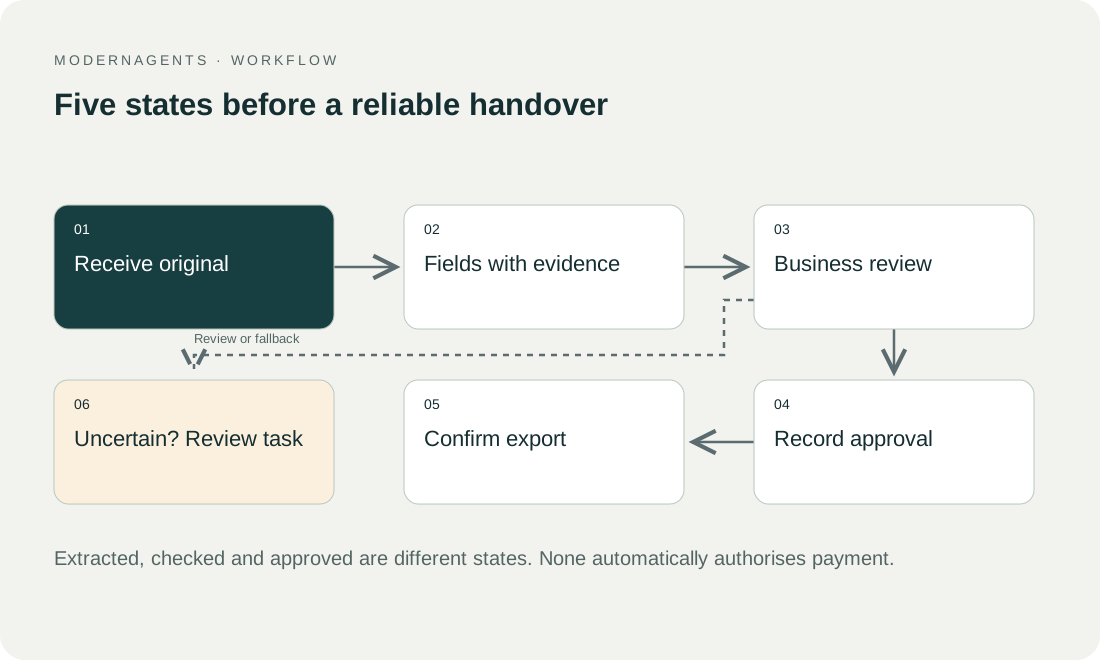
OCR can itself use machine learning. OCR means optical character recognition. Modern OCR can itself use machine learning, so treating OCR and AI as opposites is imprecise. A more useful purchasing framework separates four tasks: recognising text, understanding structure, extracting business fields and executing a transaction.
Each stage needs its own check. A scan may be readable without identifying which amount is the invoice total. Extraction may identify that total without assigning the invoice to the right company. A complete record can still fail at handoff because its supplier reference is unknown. Each stage needs its own check.
A broader definition. Microsoft describes Document AI in terms of text, layout and semantic information in business documents. This is broader than character recognition alone. Microsoft Research: Document AI, checked on 26 September 2026. For procurement, determine which of these tasks the actual product covers.
OCR, extraction models, language models and IDP cover different stages of document processing that can be combined:
| Component | What it does | Check it still needs |
|---|---|---|
| OCR | Makes text in images accessible | An accounting handoff normally also needs field assignment, normalisation, master-data matching and approval |
| Extraction model | Assigns information to fields | An available schema does not prove sufficient accuracy on your own documents |
| Language model | Can help interpret variable content | Bounded output; check critical information against source locations and deterministic rules |
| IDP workflow | Connects recognition with review and handoff | Compare complete workflows, including rejected records and uncertain transfer outcomes |
02 / 14
What does OCR do in document processing?
Scans and photographs. OCR matters particularly for scans and photographs without directly accessible text. Output commonly includes recognised words, locations and confidence information. Microsoft documents text output and handwritten-style detection in its Read model. Microsoft Read model.
Searchable storage versus accounting handoff. For searchable storage, recognition can fulfil a substantial part of the task. An accounting handoff normally also needs field assignment, normalisation, master-data matching and approval. Define the required outcome before comparing OCR page prices.
Limits start at capture. Many OCR limitations originate at capture: cut-off edges, shadows, skewed photographs, show-through or difficult handwriting. Improve capture conditions first. Enlarging a blurred image does not necessarily recover missing information. An unreadable critical field needs a better source or documented human clarification.
Character versus business accuracy. Also distinguish character accuracy from business accuracy. A mostly correct page can still contain one wrong digit in the amount that matters. Evaluate important fields separately rather than accepting a page because most of its text looks reasonable.
03 / 14
What do extraction models do?
Structured fields. An invoice model attempts to return structured fields such as invoice number, date, amounts and line items. Microsoft's Invoice model documents this kind of output. Microsoft Invoice model. An available schema does not prove sufficient accuracy on your own documents.
Prebuilt or custom. Prebuilt models can provide a useful starting point when the document type fits their intended schema. Special forms or unusual fields may need custom extraction. First check whether the required information can be returned and whether evidence connecting it to the source is retained.
Missing stays missing. Allow missing fields to remain missing. Do not force every field to contain a value. Plausible additions are particularly problematic for references, bank details and deadlines. Reviewers must distinguish source information from a value generated by a rule or inference.
Normalisation is separate. Keep normalisation separate from extraction. Converting a printed date into a standard representation is different from deciding which of several dates is the invoice date. Recording these decisions separately makes correction and diagnosis much easier.
04 / 14
What do language models add to document processing?
Where they help. Language models can reconcile different wording, categorise free descriptions or propose fields from a complex section. Models with visual input can also consider images and layout. This flexibility helps with variable documents but makes bounded output and independent checks essential.
Bounded output. Specify allowed fields, data types, null values and source evidence. Valid JSON establishes that an answer follows a structure; it does not prove that values exist in the original or are correct. Check critical information against source locations and deterministic rules.
Instructions in documents are content. Treat instructions within a document as content. A sentence asking the system to ignore checks and approve an invoice must not become a workflow instruction. Define permitted actions outside the analysed material. The model proposes information while the integration controls its consequences.
Explicit uncertainty. Use explicit uncertainty handling. For example, a contract may mention several dates without stating an effective date clearly. The useful output is a list of supported candidates with their context, not a confident choice unsupported by the text.
05 / 14
What does IDP (intelligent document processing) mean?
Break the label into functions. Intelligent document processing is not a single model that automatically solves every task. Break the label into demonstrable functions: intake, classification, splitting, extraction, validation, human review and integration. For each function, ask whether it is included, configuration-dependent or additional development.
Compare complete workflows. A system may extract exceptionally well but lack a usable review interface. Another may have good approval tools but no suitable destination connection. Compare complete workflows rather than isolated model answers, including rejected records and uncertain transfer outcomes.
Five typical document tasks call for different starting approaches and additional controls:
| Task | Often suitable starting approach | Additional control |
|---|---|---|
| Make a scanned archive searchable | OCR and controlled storage | Page completeness and search quality |
| Read recurring invoice fields | Prebuilt or custom extraction | Field checks and master-data matching |
| Capture a free-form contract clause | Model-assisted extraction with evidence | Separate professional interpretation |
| Process structured e-invoices | Parser and format validation | Business review and approval |
| Transfer a document into an ERP | Connected workflow | Destination acknowledgement and retries |
Ask for an exception. Ask to see one exception handled end to end. This often reveals more about operational suitability than another clean example. A reviewer should be able to correct a value, understand its source and resume only the affected transaction.
06 / 14
Use structured data directly where available
E-invoices. When an electronic invoice already contains machine-readable information, parsing is the appropriate first step. Reading its rendered image again can produce conflicting values and extra cost. Germany's Finance Ministry explains the distinction between structured electronic invoices and ordinary PDFs. BMF electronic invoice guidance.
Exports and system records. The same principle applies to existing exports and system records. A language model is not a necessary intermediary for every value. It can interpret a free description while identifiers, amounts and references are transferred directly.
Source precedence. Define source precedence when structured data, a visual representation and an accompanying message disagree. The responsible business specialist should determine the review path. Choosing whichever value has the highest model confidence is not an adequate general rule.
07 / 14
Synthetic comparison across three document groups
An invented business processes structured invoices, photographed receipts and maintenance reports containing free-form notes. It proposes parsing and validation for structured invoices, receipt extraction with capture-quality checks for photographs, and text recognition followed by controlled field extraction for maintenance reports.
The invented business proposes a different processing route for each document group; this is a proposed design, not a benchmark:
| Document group | Proposed processing route |
|---|---|
| Structured invoices | Parsing and validation |
| Photographed receipts | Receipt extraction with capture-quality checks |
| Maintenance reports containing free-form notes | Text recognition followed by controlled field extraction |
Different expected outcomes. The objective is not to run every document through one model. Invoices require correct amounts, currencies and references. Maintenance reports require the asset, work performed and explicitly stated follow-up action. Evaluate the components against these different expected outcomes.
An unclear date. A report says, “Check the pump again next week.” The workflow may propose a task but should not invent a binding calendar date if the reference date is unclear. That uncertainty remains visible. This distinction separates useful assistance from plausible but incorrect automation.
Limits. Include an unreadable photograph, a missing page and an unfamiliar report type. Evaluate whether the workflow recognises its limit and produces an actionable exception. A document silently omitted from the result is not a success.
Not a benchmark. The example is a proposed design rather than a benchmark. Actual selection requires running your approved documents through the shortlisted configurations and recording observed results.
Got a workflow like this?
Tell me about it. Honest take and a rough price, usually within a day.
08 / 14
Choose automated invoice processing software by the missing step
For invoice processing, begin with the accounting system's existing capture and approval functions. A separate extraction product is useful only if it closes a defined gap. The right purchase can be a native feature, a specialist document service or a connected workflow; “uses an LLM” is not a complete buying criterion.
For invoice processing, the missing step determines which route to investigate and which evidence to require:
| Situation | Route to investigate | Evidence required before selection |
|---|---|---|
| Existing capture works, but staff copy data between systems | An approved integration or workflow | Correct field mapping, destination state and recovery after a failed write |
| Scans cannot be read reliably | OCR or a document-extraction service | Results on the actual scan quality, with unreadable fields exposed |
| Supplier layouts vary widely | Structured extraction with a review interface | Field evidence, uncertainty handling and correction effort |
| Documents contain narrative explanations | A bounded language-model step | Supported interpretations with explicit abstention when evidence is missing |
| Approvals and exception queues are fragmented | A fuller IDP or process solution | Named owners, status visibility, change control and reconciliation |
Request evidence. Request an export of proposed fields and correction records, not only a demonstration score. For an incoming supplier invoice, show how the system distinguishes a payable from a sales invoice and verifies the company receiving it. A connector logo cannot answer those questions.
Compare completed cases. Compare the number of correctly completed cases and the staff work remaining. An extraction service with a low page price can become expensive if reviewers must repeatedly locate source evidence. Conversely, a more elaborate system may add little when existing software already handles the documents correctly. Use the invoice processing walkthrough to define the same task for each candidate, then review accounting integration prerequisites.
09 / 14
How do you compare two solutions fairly?
Same document set. Use the same authorised document set with independently defined expected values. Record model version, settings and preprocessing. Hold some documents back so configuration is not tuned exclusively to the examples later used for evaluation.
Measures. Measure missing, incorrect and invented values by field. Google documents precision and recall for this purpose. Google Document AI evaluation. Add workflow measures: complete cases, remaining review time, unresolved exceptions and acknowledged handoffs.
Have users do the review. A small extraction advantage can disappear if corrections are difficult. Have the eventual users perform the review task. Measure search, questions and resumption as well as clicking through recognised fields. A model comparison without this work only partly answers the investment question.
Keep failures in the denominator. Test failures without hiding them from the denominator. If a processor cannot open a document, record that result. Reporting accuracy only on successfully processed inputs can make a fragile solution look stronger than it is.
10 / 14
Include cost, privacy and maintenance
Charges. Compare page or document charges, fixed licences, model operation, storage and support. Account for repeats and multiple processing stages. If OCR, classification and extraction are billed separately, the first advertised figure is not total cost.
Data flows. For each service, establish what data it receives and retains. Local OCR and a cloud model create different data flows, but both need operation and access control. Choosing local or cloud does not replace a concrete assessment of responsibilities and information movement.
Changes. Plan for changes. Suppliers alter layouts, model versions change and destination interfaces evolve. A small frozen acceptance set helps detect regressions. Identify who approves rule changes and who can pause automatic processing when performance deteriorates.
Fallback. Maintain a clear fallback for unsupported inputs. A manual review path is useful only if someone owns it and can complete the business transaction. Otherwise difficult documents merely move from an inbox into another unmanaged queue.
11 / 14
Demonstrate correction with your own example
Provide a deliberately ambiguous line during the demonstration. Have an eventual reviewer find it, correct it and resume that specific case. Check that the correction stays connected to the right original, that the source remains accessible and that unrelated documents are not affected. This tests a concrete part of the remaining work.
Then ask what the system learns from the change. A one-off correction, a new rule and a model update are different interventions. Establish their scope and how subsequent effects can be checked or reversed.
Record this in the comparison. It complements recognition quality with maintainability: a useful product explains not only how people fix errors, but also what their corrections change in future processing.
12 / 14
How do you make an evidence-based selection?
For each document group, record the required outcome, chosen data path, demonstrated quality, remaining review and operating owner. A single percentage or attractive sample is insufficient.
Start with the simplest combination that reliably achieves the result. Use structured sources directly, OCR where text must be recovered from images and flexible models for genuinely variable content. Connect these components with explicit rules and approval. This turns a technology comparison into a document process that can be tested and operated.
13 / 14
Take the worksheet
Worksheet
Download the editable CSV table
| Approach | Suitable task | Limit |
|---|---|---|
| Parser | Read existing structured fields | Does not prove commercial correctness |
| OCR | Read text from an image | Does not establish field meaning |
| Rules and templates | Stable layouts and patterns | New variants need maintenance |
| Language model | Interpret varied wording | Can invent plausible values |
| IDP workflow | Classify, extract, validate and transfer | Depends on every processing stage |
Columns to fill in, in the file: Your value / observation, Owner, Next action.
Download the editable CSV table (CSV). Add your own values, owners and open actions. This worksheet contains no measured client results.
14 / 14
Related decisions
These guides and service pages cover the decisions next to choosing OCR, IDP or a language model:
- AI document processing: capture, review and transfer
- Automate invoice capture without hiding field errors
- Handle poor scans and handwriting in document capture
- Testing AI document processing: an acceptance template
For a workflow review, start with the task, systems involved and typical exceptions. Discuss it with modernagents.