Key takeaways
The main points for handing over an n8n project are:
- An export is neither a complete instance backup nor proof that migration will work.
- The operating guide should distinguish “not yet written,” “destination action confirmed” and “outcome uncertain.”
- In a handover exercise, a deputy receives a known incident and works only with the intended documentation and access.
01 / 09
Which questions should n8n documentation answer?
Process description. Start with a brief process description: which event starts the workflow, what result must exist, and which cases deliberately remain outside automatic processing? Name the business owner and the person who approves technical changes.
Systems and responsibilities. Then identify the systems and their responsibilities. Which system provides the authoritative customer number? Where is an approval recorded? Which application confirms completion? These questions matter more than an uncommented list of nodes.
Assumptions. Record assumptions made during implementation. For example, the design might require a unique ID on every enquiry. If a second intake channel later omits that ID, the team should recognise that an original prerequisite no longer holds.
Reasons for choices. Documentation should also explain why important choices were made. A short note saying “ambiguous matches require review because one email address can represent several accounts” preserves useful reasoning that the diagram alone cannot communicate.
02 / 09
What belongs in an n8n handover package?
An n8n handover package includes a process brief, technical inventory, data mapping, access register, test record and operating guide:
| Item | Minimum contents | Practical evidence |
|---|---|---|
| Process brief | Purpose, start, finish, exceptions and owners | The business team explains the process in its own words |
| Technical inventory | Workflow version, nodes, dependencies and environment | A second person can locate every required component |
| Data mapping | Sources, destinations, types, required fields and rules | A sample case can be traced through the process |
| Access register | Account owners, permissions, renewal and revocation | The owner can replace a connection in a controlled way |
| Test record | Inputs, expected results and actual results | Critical cases can be reproduced |
| Operating guide | Alerts, investigation, recovery and escalation | A deputy handles a simulated incident |
Storage location. Store these materials where the operating team can actually find them. Excellent documentation inside a supplier's private project account is of little use after a provider change. Link it to the workflow without including secret values.
Proportionality. Keep the package proportional to the process. A small workflow may need only a few clearly written pages. Completeness comes from answering the necessary questions, not from a large document with repeated generic material.
03 / 09
How do you hand over the export and the correct version?
Export. n8n supports exporting workflows. The official documentation explains the methods and notes potentially sensitive information in exported files. Review exports before sharing them and record which production version they represent.
Revision. A filename such as “final_new_3” is difficult to operate from. Use a traceable revision with a date and short change description. Identify which revision is published and which changes remain drafts. Version management should not allow an untested draft to be mistaken for approved production.
Source control and environments. If you intend to use integrated source-control and environment features, confirm their current availability in the chosen plan. The n8n source-control guide is the starting point. An export is neither a complete instance backup nor proof that migration will work. Product research was checked on 26 September 2026.
External dependencies. Include any external dependencies and their versions where relevant. A transferred workflow that references an unavailable sub-workflow or custom component is not a complete deliverable.
04 / 09
What does a testable handover look like in an example?
Scenario. Consider an invented workflow that transfers approved service requests into a CRM and stores associated documents. The agreed outcome is exactly one CRM case per request and a confirmed file reference. Ambiguous customers must not be matched automatically.
Five inputs. The handover package for this example contains five inputs:
- a new request
- an already processed request
- two possible customer matches
- a missing attachment
- an unavailable CRM
Each has an explicit expected result. “The error is handled” is insufficient. For two possible customers, the expected result might be an open clarification case containing both references, with no new service order.
Second person. A second person executes these cases using the written instructions. They should identify the active revision and understand which test data can be changed. The business owner then confirms the outcomes. This provides stronger evidence than a shared-screen session in which only the original developer operates the system.
Observed results. Retain the observed results, including failed cases and corrections. Acceptance should show what was actually demonstrated, rather than retrospectively describing every intended behaviour as successful.
Got a workflow like this?
Tell me about it. Honest take and a rough price, usually within a day.
05 / 09
Why does recovery belong in the handover instructions?
States. The operating guide should distinguish “not yet written,” “destination action confirmed” and “outcome uncertain.” After a timeout that may follow successful creation, first reconcile the destination. If an internal notification failed, recovery should not recreate the entire service order.
Manual interventions. Describe permitted manual interventions. Who can correct a case? Which fields need checking afterwards? How will the next automated synchronisation avoid overwriting the correction? A “manually completed” field can be useful if its meaning and effect are explicitly defined.
Recovery diagram. Use the recovery diagram below as a discussion aid. For each state, identify the actual business reference and the place where an operator can verify it. The diagram does not replace system-specific instructions, but it makes the joint review easier.
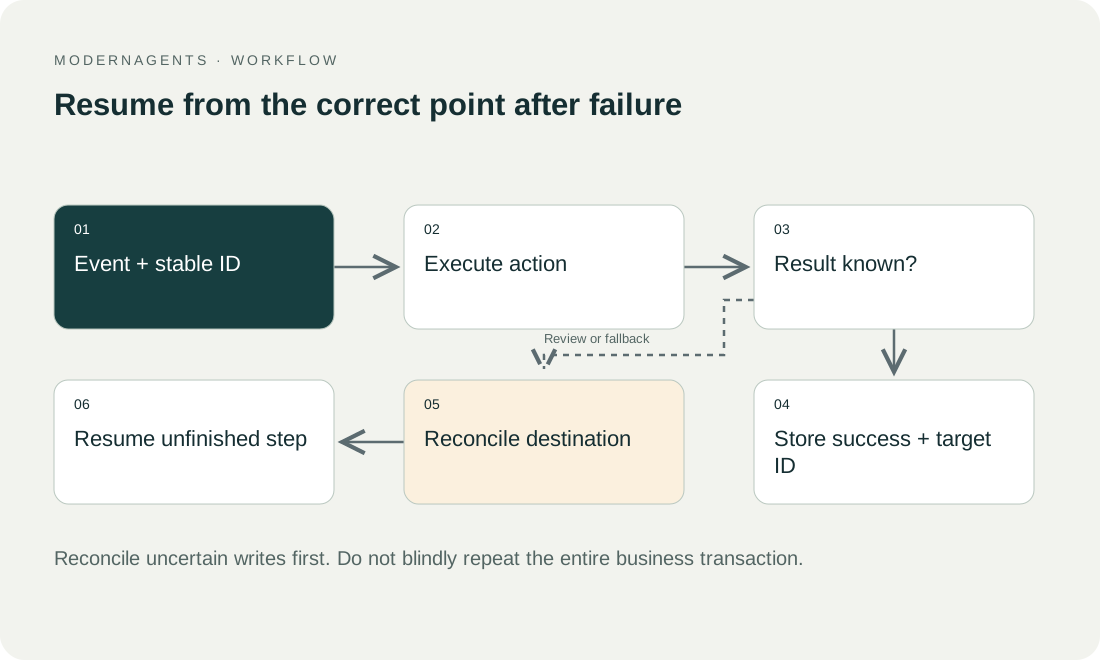
Stopping conditions. The runbook should also identify stopping conditions. An operator needs to know when to pause writes and escalate rather than repeatedly attempt a recovery whose effects are uncertain.
06 / 09
How do you test knowledge without the original developer?
Incident exercise. Arrange a handover exercise in which a deputy receives a known incident and works only with the intended documentation and access. The developer initially observes instead of narrating every action. Questions reveal gaps in instructions or responsibility.
Change exercise. A second exercise introduces a small business change, such as a new owner or additional required field. The deputy first explains which parts are affected and which tests must be repeated. Only then is the change made in the appropriate environment.
Evaluation. Evaluate understanding and controlled execution rather than speed. Deliberately requesting approval can be the correct result. A fast change made without understanding its consequences is not evidence of a successful handover.
07 / 09
Who is responsible after acceptance?
Agree who owns remaining defects, recurring maintenance and new requests. Define when implementation ends and which support arrangement applies afterwards. An open-item list should name an owner and due date; issuing an invoice does not make those items complete.
During a supplier change, review accounts, credentials, source material, contractual ownership and revocation of previous access. Then test operation under the new owner. Handover is complete when the organisation can actually control the process and its known limits are documented, rather than merely when a file has been delivered.
08 / 09
Take the worksheet
Worksheet
Download the editable CSV table
| Deliverable | Content | Evidence |
|---|---|---|
| Process | Input, output, limits | Business owner can explain |
| Systems | Accounts, permissions, owners | No private builder dependency |
| Data | Fields, keys, states | Traceable example |
| Tests | Normal and exceptional cases | Reproducible expectations |
| Operations | Alerts, substitutes, backup | Runbook usable |
| Changes | Version and rollback | Controlled change possible |
Columns to fill in, in the file: Your value / observation, Owner, Next action.
Download the editable CSV table (CSV). Add your own values, owners and open actions. This worksheet contains no measured client results.
09 / 09
Related decisions
These pages cover the service overview and the related decisions for an n8n project handover:
- n8n implementation and workflow operations
- Maintain n8n workflows with business-level monitoring
- Back up and restore n8n beyond workflow exports
- Hand over n8n credentials and permissions
For a workflow review, start with the task, systems involved and typical exceptions. Discuss it with modernagents.