Key takeaways
The main points for backing up and restoring n8n are:
- A database backup without the correct key may contain records while being unable to restore working connections.
- Rehearse recovery in an isolated environment, with automatic triggers and production write connections blocked.
- After an outage, compare unique source references with the destination objects that actually exist before production writes are enabled again.
01 / 09
Is an n8n workflow export a backup?
Workflow export. A JSON export helps transfer workflow logic or review how a process was configured. It is not a complete image of the operating environment. The official n8n backup documentation explicitly distinguishes exports from full recovery. Product details in this guide were checked on 26 September 2026.
Self-hosted scope. For self-hosting, backup scope depends on the installation. Include the database in use, the n8n user directory or its configured location, external file storage and custom extensions where applicable. Copying a directory is not enough if the actual database lives in another service.
Encryption key. Credentials are encrypted. Their corresponding key material must be available for recovery. A database backup without the correct key may contain records while being unable to restore working connections. Protect the key through controlled storage rather than placing it among ordinary, broadly accessible project files.
02 / 09
Which n8n components must a backup cover?
Build the backup list from your actual architecture:
The table lists six components an n8n backup may need to cover: workflow definitions, database, keys and configuration, files and external storage, extensions and version records, and business processing state.
| Component | Why it matters | Recovery evidence |
|---|---|---|
| Workflow definitions | Logic and connections between steps | A reference case follows the expected path |
| Database | Instance state and retained information | The matching version opens with expected objects |
| Keys and configuration | Decryption and correct connections | An approved test connection succeeds |
| Files and external storage | Attachments or other required binary data | A reference file is fully retrievable |
| Extensions and version records | Required nodes are available | No missing components in the restored test |
| Business processing state | Safe continuation of open cases | Inputs reconcile with destination outcomes |
Adapt the list. Not every installation uses every component. Remove irrelevant rows and add actual locations, owners and procedures. A generic checklist cannot replace an inventory of the system you operate.
Dependencies. Include dependencies that are easy to overlook. For example, a workflow may call another workflow, use a custom node or expect a particular environment setting. A restore that imports the visible canvas but misses these dependencies can appear complete until the first execution.
03 / 09
Why does consistency matter more than a successful copy job?
Consistent state. A backup must represent a recoverable state. If files, database and configuration are captured at unrelated times, their relationships may not be consistent. Use a backup method appropriate to the database. For SQLite, n8n describes stopping before copying or using an appropriate consistent snapshot; PostgreSQL requires its database backup procedure.
Storage location. Establish where the backup remains after a container is removed or recreated. Files stored only in the container's transient filesystem can disappear with it. The backup must remain accessible independently of the component being replaced.
Visible results. Make the backup time, result, size and retention visible. An unexpectedly small file or a timestamp that has not changed for days should trigger investigation. A successful copy command is not evidence that restoration will work.
Related components. Where several components are backed up separately, record their relationship. The recovery instructions should identify which configuration and application version belong with a particular database backup.
04 / 09
How does backup frequency depend on tolerable data loss and interruption?
Two objectives. Define the maximum tolerable loss of newly captured work and the maximum acceptable interruption. Plain-language examples are “inputs from the last hour must be reconstructable” and “the process must be usable within one working day.” These are illustrative objectives, not universal recommendations.
What can be read again. A weekly report whose source data remains available is different from an approval process containing unique human decisions. Determine which information can be read again and which exists only inside the workflow environment.
Limits of a backup. This also establishes whether backups alone are sufficient. Yesterday's backup does not contain an approval granted today. If that decision is not recorded elsewhere, recovery may require a new approval. Do not hide that business gap behind an ambitious technical recovery target.
Got a workflow like this?
Tell me about it. Honest take and a rough price, usually within a day.
05 / 09
How do you rehearse recovery without repeating production actions?
Isolated restore. The following is a proposed exercise, not a test already performed. Restore a copy in an isolated environment. Block automatic triggers and production write connections before the instance can begin processing work.
Order of checks. After the restore, check in this order:
- First verify the application version, database and required nodes.
- Next, check credentials through an authorised test access and retrieve a known reference file.
- Only then run selected business cases against controlled destinations.
Total time. Measure the entire procedure, including obtaining missing access and making manual decisions. A 20-minute technical restore is of limited value if only an absent employee can release the key. Record every missing detail and update the instructions immediately.
Second operator. The person conducting the exercise should not need undocumented knowledge from the original developer. A second operator following the written procedure is a useful way to discover dependencies that have never been recorded.
06 / 09
How do you reconcile business outcomes after an outage?
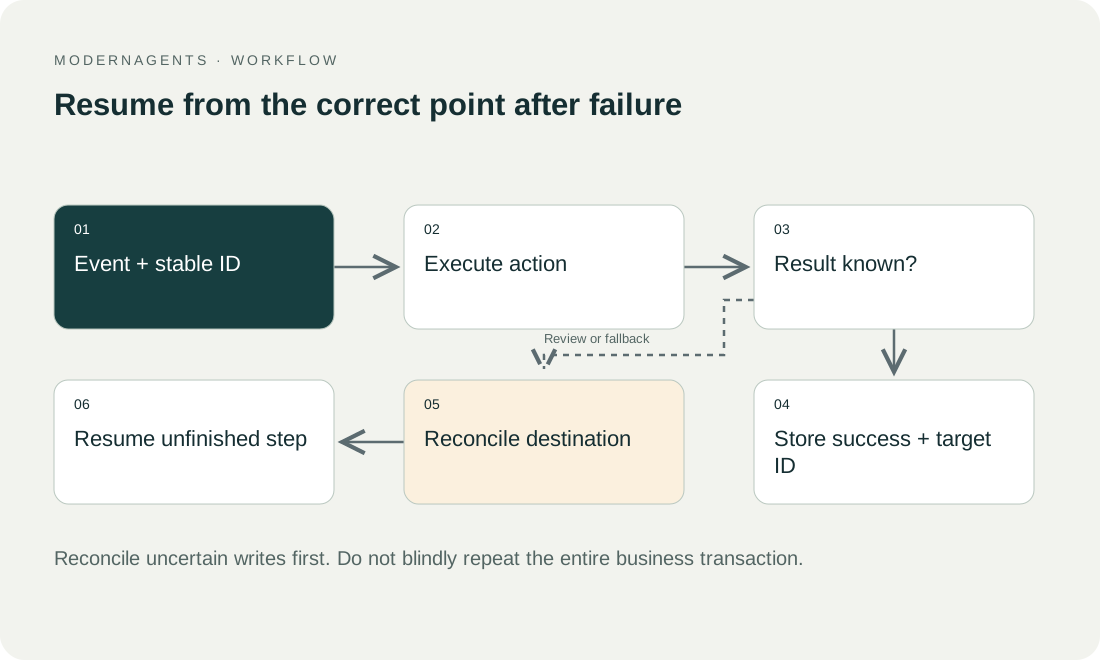
Illustrative example. Imagine an illustrative service process with 100 incoming cases. Before the failure, 72 were created in the CRM, 18 were still waiting and ten lacked required information. The restored database, however, knows of only 65 confirmed destination writes.
Reconciliation. Blindly restarting every apparently open case could create seven duplicate CRM records. Instead, compare unique source references with the destination objects that actually exist. Record the seven recovered matches, process only the 18 genuinely missing cases, and leave the ten clarification cases visibly unresolved.
Backup and duplicate protection. This illustrates why backup and duplicate protection belong together. A backup restores an earlier state, while the destination may have continued processing. Recovery must resolve that difference before production writes are enabled again.
Unsearchable destinations. If the destination cannot be searched reliably by a stable reference, document that limitation. Some ambiguous cases may need human investigation rather than automatic replay.
07 / 09
How do you protect backups, and what does n8n Cloud cover?
Protection. Backups can contain the same confidential information as production. Define access, encryption, retention and controlled deletion. Do not export decrypted credentials into ordinary project storage. If a justified migration temporarily requires plaintext, protect that operation separately and remove the temporary material afterwards.
n8n Cloud. For n8n Cloud, check the contracted backup and restoration scope. Your own workflow export may improve portability, but it does not establish what execution history or other data can be recovered. Obtain concrete answers about accidental changes and deletions.
Acceptance. Acceptance should consist of a documented restore followed by an outcome test. Retain the date, backup used, elapsed time, outstanding differences and approval. That converts “we have backups” into an evidenced ability to resume the business process.
08 / 09
Take the worksheet
Worksheet
Download the editable CSV table
| Component | Purpose | Check |
|---|---|---|
| Database | Workflows and state | Consistent restore |
| Encryption key | Recover usable credentials | Protected availability |
| File/external storage | Referenced content | Files actually present |
| Runtime configuration | Versions and extensions | Reproducible environment |
| Runbook | Recovery sequence | Another person can follow it |
Columns to fill in, in the file: Your value / observation, Owner, Next action.
Download the editable CSV table (CSV). Add your own values, owners and open actions. This worksheet contains no measured client results.
09 / 09
Related decisions
These pages cover the service overview and the related decisions for n8n backup and recovery:
- n8n implementation and workflow operations
- n8n Cloud or self-hosting: assign operating responsibility
- Maintain n8n workflows with business-level monitoring
- Hand over an n8n project with tests, ownership and recovery
For a workflow review, start with the task, systems involved and typical exceptions. Discuss it with modernagents.