
Key takeaways
The main points for n8n error handling and retries are:
- A timed-out write may have changed the target; treat it as an uncertain outcome and first check the destination before another attempt.
- A retry toggle is not a complete business recovery procedure; assign a time budget to each retriable request.
- According to the official documentation, the Error Trigger handles failures in automatically started workflows; manually running the main workflow in the editor does not exercise the same notification path.
01 / 09
Which n8n failures should be retried, and which should not?
The table distinguishes these failure situations and their useful responses.
| Situation | Useful response | Behaviour to avoid |
|---|---|---|
| A service temporarily limits requests | Follow its guidance and retry after a delay | Rapid, unlimited retries |
| A required field is missing | Create a clarification case identifying the field | Resending the same invalid record |
| Access has been revoked | Ask the owner to repair the connection | Retrying indefinitely with the same credentials |
| The response to a write never arrives | Reconcile the destination outcome | Blindly creating another object |
| An unfamiliar technical fault occurs | Preserve diagnostic context and escalate | Silently treating failure as success |
HTTP status. An HTTP status helps classification but is not sufficient on its own. Read the provider's error details and API contract. A conflict could indicate an existing resource or an invalid state change; those call for different responses.
Business consequence. Design the classification around the business consequence. A failed read normally leaves the target unchanged. A timed-out write may have changed it. Treating both as identical exceptions is a common cause of duplicate records.
02 / 09
When should you use Retry On Fail?
What n8n provides. n8n provides Retry On Fail and combinations of loop and wait steps for controlling request timing. The official rate-limit guide explains these options. Check the attempt count and delay for the exact node in use; a retry toggle is not a complete business recovery procedure.
Time budget. Assign a time budget to each retriable request. An internal report might reasonably wait several minutes. An appointment confirmation may need a faster decision or a manual alternative. Retries should eventually produce a visible unresolved case rather than consume resources indefinitely.
Shared limits. When several workflows use the same API, account for their combined load. Individually modest workflows can still exceed a shared allowance. Plan against the actual limit boundary, such as an account, tenant or API key.
Provider wait instructions. Respect provider instructions about waiting before the next request where available. If a workflow cannot support the required dynamic delay directly, build and test an explicit scheduling path rather than assuming a fixed pause handles every response correctly.
03 / 09
What if the write succeeded but its response disappeared?
Example. Consider an invented example. A workflow requests creation of a service order using the external reference REQ-2048. The destination creates the order, but its response is lost. n8n observes a timeout. Restarting the entire process could create a second order.
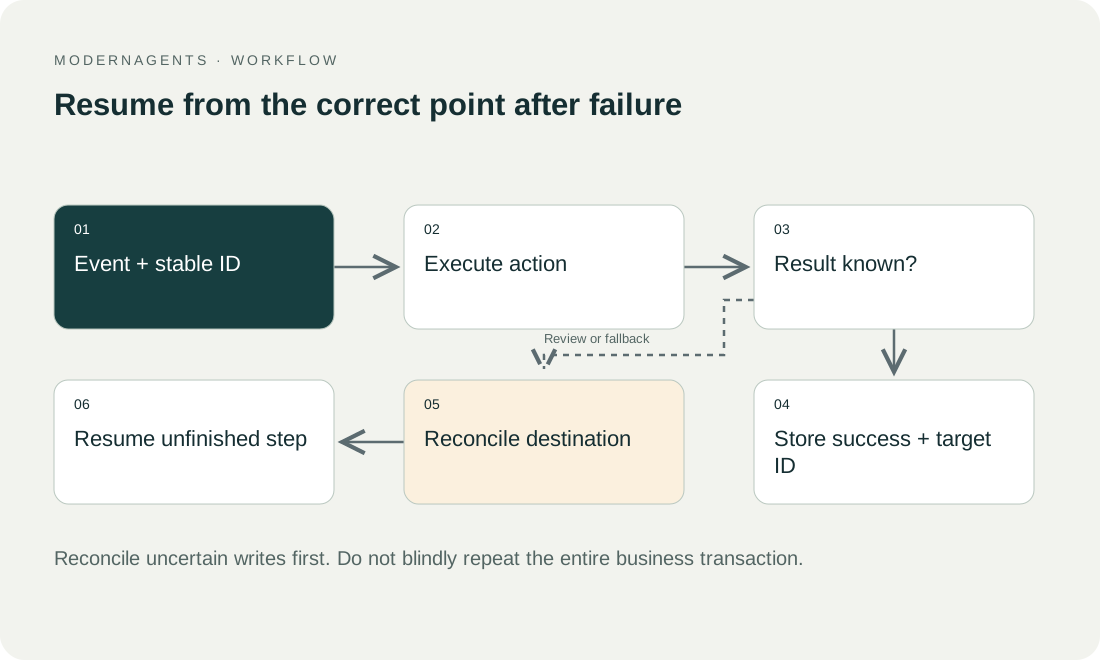
Uncertain outcome. A robust design treats this as an uncertain outcome, not immediately as a confirmed failure. First check whether the destination contains an order with that external reference. One unambiguous match allows the workflow to record its target ID. No match may permit another attempt. Multiple matches require investigation.
Idempotency. Where supported, use the destination API's explicitly documented idempotency mechanism, reusing the same key for the same business transaction. Do not assume every API provides this behaviour. Without reliable duplicate protection, consequential actions may need human review before another write.
Concurrency. A search before creation is not a complete solution to concurrency. Two simultaneous runs might both find no record and then both create one. That requires an effective uniqueness rule or controlled serialisation in the chosen architecture. Validate the approach against the actual target system.
04 / 09
How do technical alerts differ from business clarification?
Error workflow. A central error workflow can report technical failures. n8n associates it with the main workflow through workflow settings, and it begins with an Error Trigger. The official error-handling documentation explains setup and the available error information.
Business exceptions. Not every business exception needs to become a technical crash. A missing customer match can deliberately enter a clarification queue and remain visible as unresolved work. The essential requirement is that monitoring includes that state. “No technical failure” must not be interpreted as “business task completed.”
Stop and Error. For unexpected conditions, or conditions deliberately defined as severe failures, a Stop and Error step may be appropriate. Give errors meaningful categories. “Multiple customer matches” helps an operator more than an arbitrary internal variable name.
Ownership. Keep ownership specific. Data clarification may belong to a sales administrator, while expired application permissions belong to an identity administrator. A single support mailbox can receive both, but the operating procedure must identify who can actually resolve them.
Got a workflow like this?
Tell me about it. Honest take and a rough price, usually within a day.
05 / 09
How do you test the error notification?
Automatic trigger path. According to the official Error Trigger documentation, it handles failures in automatically started workflows; manually running the main workflow in the editor does not exercise the same notification path. Test through the intended automatic trigger in a controlled environment.
Trigger failures. Also test a failure in the trigger itself. The available information can differ from a failure in a later node. An alert template should not blindly assume that every error includes a saved execution ID or execution URL.
Notification contents. A useful notification identifies the process, failure category, case reference and responsible person. Keep sensitive payloads inside the protected system. Send the alert channel only what is needed to classify and investigate the incident.
06 / 09
How do you recover from explicit states?
For a process with several consequential steps, define a small state model:
- received
- validated
- target action confirmed
- follow-up pending
- completed
Store only the states needed for reliable continuation and traceability.
Resume at the missing step. If order creation succeeds but an internal notification fails, recovery should not repeat order creation. Resume with the missing notification instead. Check whether it was sent by another route and whether its contents are still current before replaying it.
Evidence. The state needs supporting evidence. “Written” without a destination ID is difficult to verify. “Completed” while a required check remains open is incorrect. The team should be able to explain these rules using real process examples rather than relying on a green node in the editor.
07 / 09
Which cases belong in the acceptance matrix?
Test these cases for n8n error handling:
- a temporary outage
- permanently invalid data
- revoked access
- a lost response after a successful write
- the same input delivered twice
Add parallel deliveries where the real process can produce them.
Expected results. For each case, define before testing:
- the expected state
- permitted retries
- the visible notification
- the human owner
- the expected number of destination objects
The key result is often “exactly one business transaction,” rather than “eventually green.” Automatic retries become defensible only after that relationship has been demonstrated for the relevant action.
08 / 09
Take the worksheet
Worksheet
Download the editable CSV table
| Failure | Response | Avoid |
|---|---|---|
| Temporary read limit | Bounded delay and retry | Fast infinite loop |
| Invalid required field | Business review | Repeated unchanged input |
| Expired access | Owner renews access | Treating error as empty data |
| Timeout after write | Reconcile by stable key | Blind second creation |
| Partial batch success | Resume outstanding items | Repeat entire batch |
Columns to fill in, in the file: Your value / observation, Owner, Next action.
Download the editable CSV table (CSV). Add your own values, owners and open actions. This worksheet contains no measured client results.
09 / 09
Related decisions
These pages cover the service overview and the related decisions for n8n error handling:
- n8n implementation and workflow operations
- Connect n8n to APIs and webhooks with a clear contract
- Maintain n8n workflows with business-level monitoring
- Detect duplicate invoices with business keys and review
For a workflow review, start with the task, systems involved and typical exceptions. Discuss it with modernagents.