Key takeaways
- Approval must refer to a specific document version and valid authority.
- The four-eyes principle describes a control arrangement, not one universal statutory approval chain for every invoice.
- Limits are organisation-specific: record whether they apply to net or gross amounts, which currency is used and how conversions are handled.
- A timeout should not produce automatic approval unless that is an explicitly authorised and appropriately assessed business rule.
01 / 09
What must an invoice approval actually confirm?
An invoice approval separates five questions:
- Is the invoice readable and complete?
- Was the service delivered?
- Do order and amount match?
- Who can authorise the expense?
- Should it be paid?
Different roles may be involved. A single unexplained approval leaves it unclear what was actually checked.
The four-eyes principle describes a control arrangement, not one universal statutory approval chain for every invoice. Define your organisation's requirements with the responsible people. The workflow implements those decisions; two clicks should not be presented as automatic legal compliance.
Define rejection too. It may mean an unjustified charge, missing information or an incorrectly assigned reviewer. Those outcomes require different next actions and should not share one ambiguous state.
02 / 09
What does an approval matrix contain?
An approval matrix assigns the intended review and next action to each condition:
| Condition | Intended review | Next action |
|---|---|---|
| Invoice linked to an order | Compare order and receipt | Business owner approves |
| No purchase-order reference | Confirm service and cost allocation | Additional budget approval where required |
| Amount exceeds an internal limit | Additional authorised role | Continue only after required decisions |
| New bank details | Separate master-data control | No automatic change |
| Owner unknown | Clarification queue | No unrestricted model assignment |
| Content changes after approval | Reassess the relevant change | Preserve earlier approval as history |
What must each approval limit specify?
Limits are organisation-specific. Record whether they apply to net or gross amounts, which currency is used and how conversions are handled. “Above 5,000” is not an executable rule without that context.
Check related transactions where your policy requires it. Splitting one expense across several invoices may change which controls are needed. The workflow should implement the approved policy rather than assuming every document is an isolated purchase.
03 / 09
When is sequential or parallel review the right choice?
Sequential or parallel. Sequential approval is useful when one decision is a prerequisite for the next. Parallel review can suit independent checks by several departments. State whether everyone must approve, one designated role is sufficient or any rejection stops progress.
Tool support. Power Automate documents multi-stage approval with preliminary and subsequent decisions. Microsoft sequential approvals, checked on 26 September 2026. An available action does not replace business-rule design and an appropriate decision record.
No vague groups. Avoid vague shared groups. Ten people seeing a task does not make the process faster if nobody owns it. Define the current owner, permitted substitute and escalation when an internal handling deadline is exceeded.
04 / 09
What must the review interface show and record?
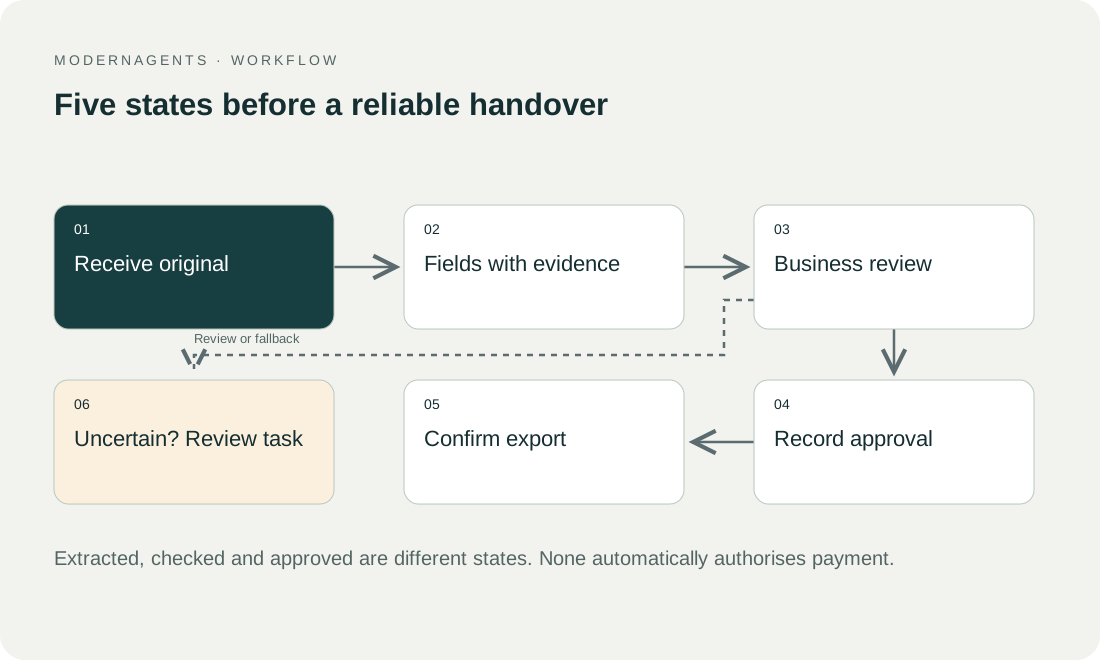
Reviewers need the original, extracted fields, comparison results and outstanding warnings together. For discrepancies, show the source and affected values immediately. An approval email without document or context encourages superficial decisions.
Record the person or role, time, document version, decision scope and relevant comment. Check that the person is authorised at decision time. An old task link must not be treated as continuing authority after role changes.
Make the consequences clear. Approving delivery should not silently change bank details or authorise payment unless those actions are explicitly part of the approved responsibility. Precise labels help staff understand what their decision will do.
Got a workflow like this?
Tell me about it. Honest take and a rough price, usually within a day.
05 / 09
Synthetic example: a revised invoice crosses a limit
The first approval. In an invented business, a project manager checks an invoice for EUR 4,800 net. Under its illustrative internal policy, the manager confirms delivery, while amounts above EUR 5,000 net also require department-head approval. These figures are planning assumptions, not general recommendations.
The corrected invoice. A corrected invoice for EUR 5,200 arrives after the first approval. The workflow identifies the new version, connects it to the existing case and records that the earlier decision applied to the old content. It requests the approvals required for the new amount. The earlier approved state must not simply transfer to the replacement file.
What the department head sees. The department head sees why the case returned, which values changed and what historical confirmation exists. Once review is complete, the current approved version proceeds. Payment remains a separate step with its own controls.
A non-financial change. A useful acceptance case also changes a non-financial but important field, such as the recipient company. Reapproval should be driven by the significance of the change, not only whether the amount increased.
06 / 09
How are cover, reminders and escalation handled?
Substitutes
Arrange cover before absences and limit substitutes to permitted cases. Specify whether the original owner is informed and how existing tasks transfer. Forwarding a notification email is not a clean change of authority.
Reminders and escalation
Reminders must use current status. Check immediately before sending whether a decision has already been made. After an agreed interval, an authorised role takes responsibility for clarification. A timeout should not produce automatic approval unless that is an explicitly authorised and appropriately assessed business rule.
Technical timeouts
Distinguish a workflow engine's technical timeout from a business payment deadline. Long-running cases need a persistent, findable task even if one technical execution ends.
Disputed invoices
Provide a way to pause a disputed invoice without losing it. The pause should record a reason, owner and next review point. Otherwise unresolved disputes can disappear from routine reporting while still requiring action.
07 / 09
How do you accept and monitor the approval workflow?
Test cases. Test normal approval, rejection, clarification, wrong role, absence, boundary amount, currency and a changed document after consent. Add a double click and lost response. Neither should cause duplicate handoff or an incorrectly recreated case.
Measures. Measure time at each stage, open tasks, returns and decisions made without complete context. If people miss warnings, a fast process is still not a success. Analyse delays by cause: missing evidence, unclear ownership or a genuine dispute.
Traceability. For every invoice, the completed workflow should explain which version was approved, by whom, for what purpose, what remained unresolved and what happened afterwards. That traceability is the practical foundation of dependable digital invoice approval.
08 / 09
Take the worksheet
Worksheet
Download the editable CSV table
| State | Responsible role | Next action |
|---|---|---|
| Received | Intake reviewer | Check duplicates and completeness |
| Business query | Buyer or service recipient | Document clarification |
| Business check complete | Business owner | Send to accounting review |
| Payment approval pending | Authorised signatory | Approve or reject |
| Changed after approval | Relevant reviewers | Obtain affected approval again |
Columns to fill in, in the file: Your value / observation, Owner, Next action.
Download the editable CSV table (CSV). Add your own values, owners and open actions. This worksheet contains no measured client results.
09 / 09
Related decisions
These guides and service pages cover the decisions next to an invoice approval workflow:
- AI document processing: capture, review and transfer
- E-invoices: separate parsing, validation and approval
- Match purchase orders, delivery notes and invoices
- AI workflow approvals: who checks which action?
For a workflow review, start with the task, systems involved and typical exceptions. Discuss it with modernagents.