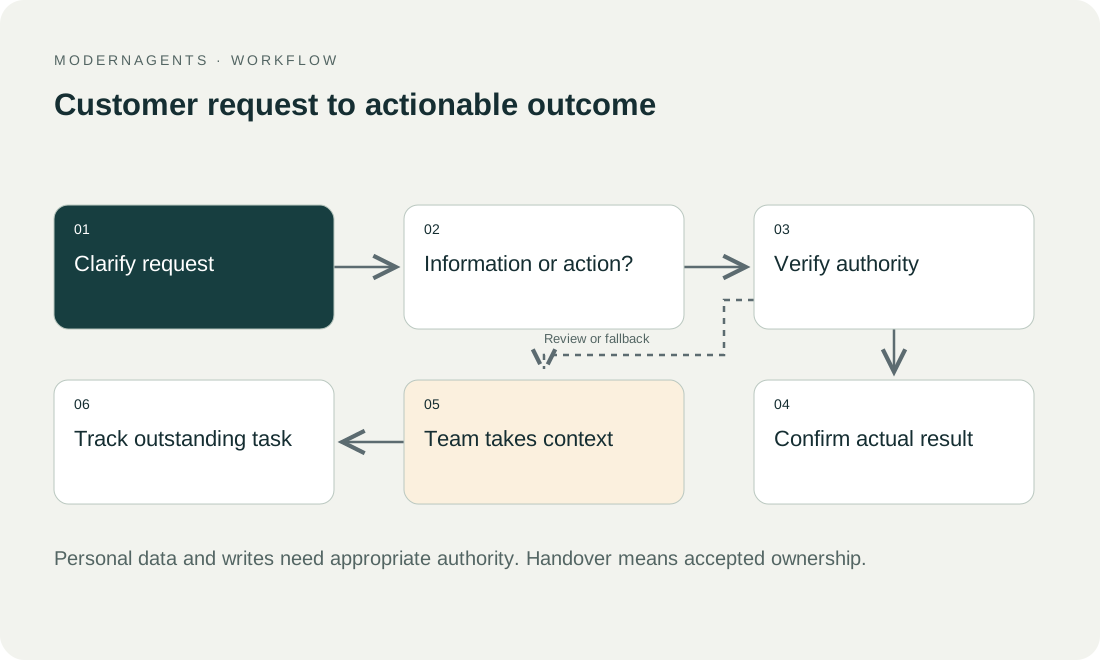
Start with a few explicit use cases, such as product questions, contact intake or authorised status enquiries. Define authoritative sources, permitted actions and where unresolved requests go. This guide is a complete implementation and acceptance plan, not a tested installation for a particular CMS.
Key takeaways
The main points for adding an AI chatbot to a website are:
- Start with a few explicit use cases, and define authoritative sources, permitted actions and where unresolved requests go.
- The article compares four integration routes: a native shop or helpdesk feature, a provider widget, an embedded web view and a custom interface using a supported API.
- Determine what information is transmitted on page load, when chat opens and when a message is submitted.
- The integration is complete when interface, data access, knowledge, handover and operation have been assessed together.
01 / 15
Where does the chat belong in the website journey?
Placement. Place chat where visitors need help completing a task. On a product page it may explain characteristics; on a contact page it may structure an enquiry. During checkout it must not cover important controls, errors or required information.
Purpose at launch. Explain its purpose at launch: what can the assistant answer and how can users reach staff? A greeting that repeatedly opens itself can interrupt the main task. Test discoverability and restraint together instead of maximising chat-window openings alone.
Information outside chat. Keep important information accessible outside chat. Opening hours, service scope, contact details and relevant conditions should not require a conversation. This serves people who do not want to use chat and avoids making the whole service dependent on an additional supplier.
02 / 15
Native feature, widget, embedded view or custom interface: which route fits?
The table compares four integration routes for a website chatbot (native feature, provider widget, embedded web view and custom interface) by when each may fit and the scope to verify.
| Integration route | When it may fit | Scope to verify |
|---|---|---|
| Native shop or helpdesk feature | Existing software covers the tasks | Plan, sources, handover and account access |
| Provider widget | Standard interface with documented installation | Loading, branding, cookies and channels |
| Embedded web view | Separately hosted interface | Size, focus, authentication and framing policy |
| Custom interface using a supported API | Particular interaction or system needs | Development, access, security and operation |
Documented production route. Use the provider's documented production route. Microsoft explicitly distinguishes its demo website from live embedding; the demo is not intended as the public production service. Source checked on 26 September 2026.
Custom interface. A custom interface should answer a concrete need. If a standard widget is accessible and supports the workflow reliably, extra development may add unnecessary maintenance. Conversely, do not discard essential requirements simply because a default view can be installed quickly.
03 / 15
Who owns the accounts and environments?
Account ownership. Decide who owns the bot account and holds administrative rights. The website agency, service team and integration partner may have different roles. The operator should retain necessary access and agreements even if the original project partner is unavailable.
Test and production. Separate test and production to the extent supported by the products. Test conversations must not send real customer notifications or trigger payments. A test domain may need its own allowed origins and configuration. Record which settings are genuinely separate and which remain shared.
Existing installations. Inventory existing chat and tracking installations. The same widget may already be present in a theme, plugin and tag manager. Loading it several times can create duplicate events or overlapping interfaces. Choose one maintained installation location.
04 / 15
Which data flows before and after the chat loads?
What is transmitted. Determine what information is transmitted on page load, when chat opens and when a message is submitted. This may include technical identifiers, page context and later conversation content. A visible consent dialog does not guarantee that an already loaded script made no earlier connections.
Austria and Germany. Austria's Data Protection Authority explains cookie requirements, while Germany's section 25 TDDDG is relevant to device access. Assess the particular widget purpose and technologies for the target market. A product checkbox does not provide blanket legal approval.
Declined options. Then test actual behaviour after optional features are declined. Is a useful contact route still available? Can the desired chat be activated clearly? Avoid an empty panel silently waiting for permission that the user has not granted.
05 / 15
How do you keep browser protections and credentials safe?
Content Security Policy. A Content Security Policy can control permitted scripts, connections and embedded content. The MDN CSP guide explains this mechanism. Add only the provider destinations actually required and test them within the intended security policy.
No wholesale exceptions. Do not disable protections wholesale because the widget is initially blocked. Establish the supported destinations and embedding method with the supplier. Document dependencies so a later provider change does not leave an unexplained collection of overly broad permissions.
Secret credentials. Secret CRM or model credentials do not belong in publicly delivered website code. Authorised system connections need appropriate server-side or provider-protected mechanisms. A public widget identifier may legitimately form part of installation; it is not equivalent to a privileged API credential.
06 / 15
How do you separate public knowledge from personal enquiries?
Public or personal. Visitors may ask general questions without an account. Reading a specific order or contract requires the approved authentication and permission route. A typed reference number or email address alone does not justify revealing personal details.
Sessions. Connect identity to the permitted records and actions. After sign-out, an existing chat must not continue returning protected information. Explicitly test account and session changes, including a shared device.
Account portal. If the secure connection is not available, direct the customer to an existing account portal. That is a clear supported route. Do not claim the bot inspected order data when it only read general shipping rules.
07 / 15
How do you publish knowledge with traceable validity?
Approved sources. Select approved sources for the agreed tasks. More documents do not automatically improve answers. Old prices, internal notes and contradictory country pages need resolution before release.
Ownership and validity. Record source ownership, market, language and validity. Then inspect actual retrieval and the answer generated from it. Successful upload does not prove that the bot finds the right passage or preserves an exception.
Unanswerable questions. Unanswerable questions need an explicit clarification or handover route. The chat should not present general model assumptions as company commitments. Source links must support the claim and be accessible to the visitor.
Got a workflow like this?
Tell me about it. Honest take and a rough price, usually within a day.
08 / 15
Synthetic journey: product question followed by a callback
Product question. A fictional visitor asks whether a product suits a particular use. The bot explains characteristics present in the approved description and identifies an unresolved technical point. The visitor requests a callback.
Callback request. The chat collects only necessary contact details and desired timing, then shows a short correctable summary. Once case creation is confirmed, it acknowledges receipt. It may confirm an exact appointment only if the authoritative scheduling system actually confirms a booking.
Outage test. In the outage test, the ticket system fails to respond. The widget remains usable and shows an alternative contact route. It neither claims a callback request exists nor blindly repeats the write operation. An operator checks whether the original request was created despite the lost acknowledgement.
09 / 15
How do you test mobile and assistive-technology use?
Keyboard and screen reader. Inspect opening, typing, new messages, links, errors and closing with a keyboard and screen reader. For genuinely modal interfaces, the W3C dialog pattern is useful. Do not apply modal semantics to a non-modal panel without matching its behaviour.
Narrow display. Test a narrow display with the software keyboard open. Send and close controls must remain reachable, and longer messages must remain readable. A chat covering the consent controls or purchase button creates a problem even when its answers are correct.
Focus and errors. New messages should not repeatedly remove focus from the input. Errors should preserve drafts and offer understandable correction. Include the complete transition to an account portal or form; accessible widget controls alone do not establish an accessible service journey.
10 / 15
Does the chatbot slow the website down?
Measurement. Measure representative pages with and without the integration on comparable devices. Web Vitals addresses loading, responsiveness and visual stability. Supplement these metrics by checking whether people can still reach the main content and important controls promptly.
Delayed loading. Delayed loading may be appropriate, but must fit the intended service and privacy assessment. Test the first chat launch as well as later visits. Fast page text provides limited benefit if clicking chat produces a long unexplained wait.
Navigation. Check navigation and the back button. Modern sites may not perform a complete reload between pages. The widget must not initialise repeatedly or retain another account's context accidentally. Include these cases in browser acceptance.
11 / 15
Does a chatbot replace content for search engines?
Chat does not replace structured service and help pages. Google describes crawling, rendering and indexing for JavaScript websites as distinct considerations. An answer individually generated during a conversation is not a dependable public information page.
Maintain central answers on accessible, current URLs and let the bot link to them. A widget does not guarantee better search rankings or mentions in AI search. Repeated questions, evaluated with appropriate anonymisation, can inform editorial planning; produce reviewed pages from that insight rather than publishing raw conversations.
12 / 15
What happens when the chat service is blocked?
Some visitors use browser extensions or networks that block external chat services. Test a service that fails to load. The rest of the website should remain functional, with a visible contact route that does not depend on the widget. An endless loading animation is not a useful error explanation.
Also verify whether a broken connection preserves an existing draft and makes retry behaviour understandable. Users should not have to guess whether they are sending the same request twice. Confirmed receipt requires an actual acknowledgement from the responsible process, rather than a success graphic displayed locally by the interface.
13 / 15
What should you record for release, rollback and operation?
Release record. Document approved tasks, source revision, installation location, allowed connections and responsible people. Test the published version in a new session and at least one ongoing conversation. The preview and customer interface may show different revisions.
Rollback. Provide a targeted way to stop faulty capabilities or the entire widget. Contact details and important website information should remain available. After correction, repeat the affected cases before restoring the feature.
Completion. The integration is complete when interface, data access, knowledge, handover and operation have been assessed together. A visible chat button is the beginning; an understandable and confirmed customer process is the intended outcome.
14 / 15
Take the worksheet
Worksheet
Download the editable CSV table
| Area | Decision | Test |
|---|---|---|
| Pages | Useful placement | Product and contact pages |
| Knowledge | Approved sources | Known and unknown question |
| Actions | Information or account access? | Forbidden change |
| Handover | Receiving team | Available and absent |
| Interface | Mobile and assistive use | Open, type, close |
Columns to fill in, in the file: Your value / observation, Owner, Next action.
Download the editable CSV table (CSV). Add your own values, owners and open actions. This worksheet contains no measured client results.
15 / 15
Related decisions
These pages cover the service overview and the related decisions for a website chatbot:
- AI chatbots for customer service
- Compare chatbot providers for customer service
- Review chatbot data, suppliers and deletion
- Test chatbot accessibility and alternative contact routes
For a workflow review, start with the task, systems involved and typical exceptions. Discuss it with modernagents.